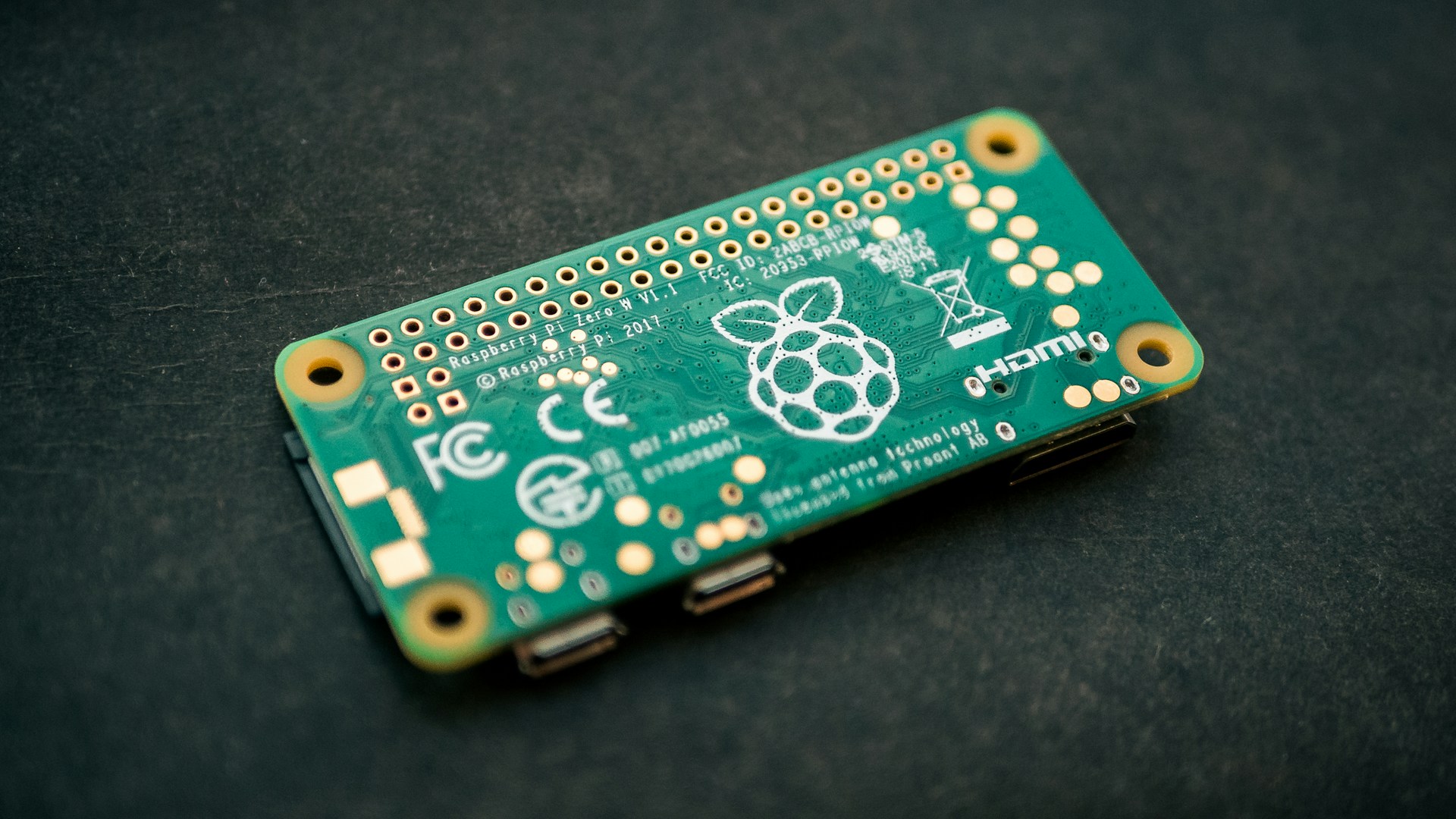
This scheme uses two devices on a ad-hoc WAN:
- key — a small always-on device hosts private Wi-Fi hot spot
- vault — the main encrypted storage device
The full unlock credential is derived by combining the vault’s CPU serial with the key’s CPU serial + stored passphrase. Neither device alone holds the complete key.
[!NOTE] This has been tested with the key being a raspberry pi zero w, 2w, 3b & 4b. The encryption was done using a pi 4b with a USB stick flashed with Ubuntu
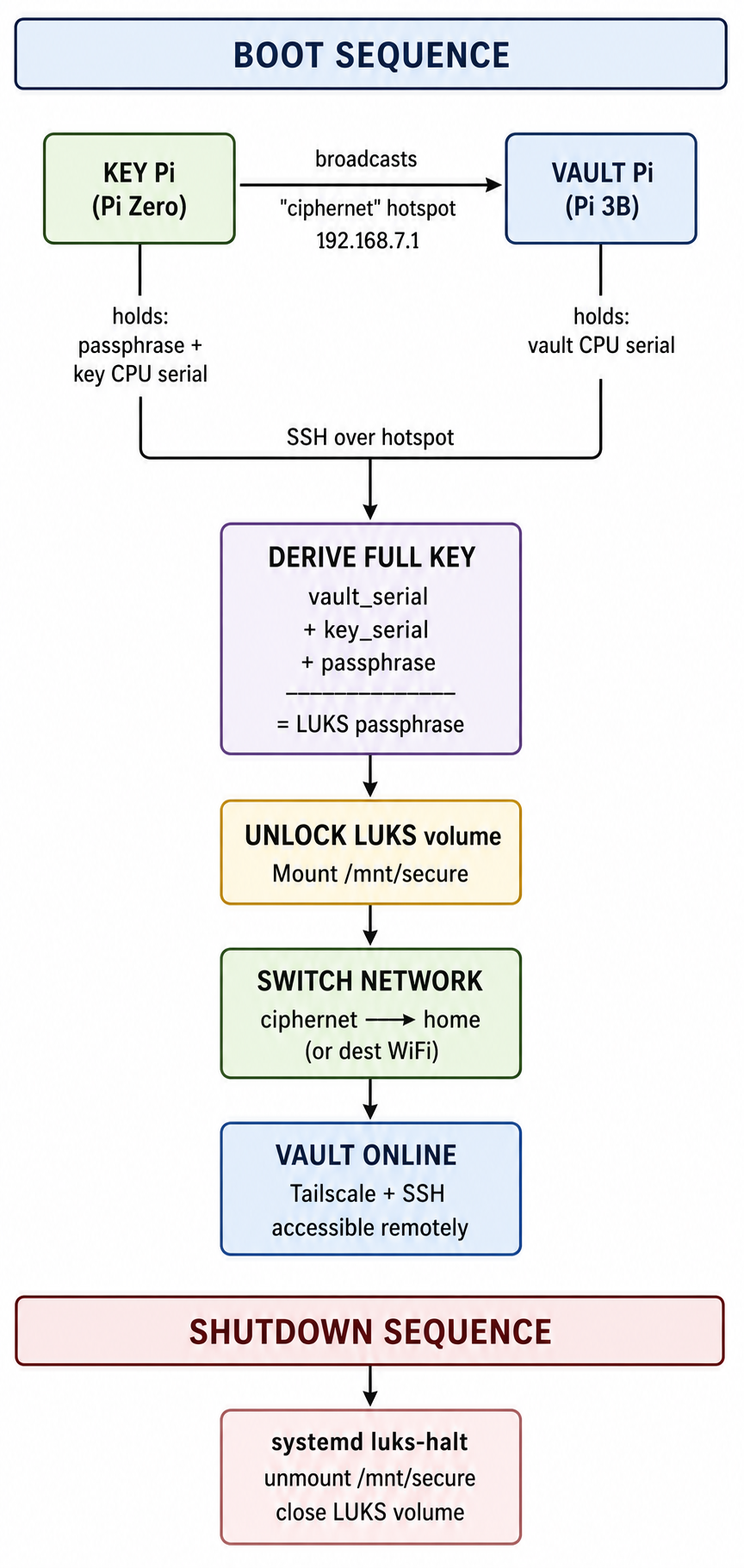
Phase 1 — Key device setup
Prepare the key device: harden it, create the service account the vault will SSH into, and enable temporary password auth so the vault can get its public key.
echo "=== Phase 1: key device hardening ===" && \
sudo apt update && \
sudo apt full-upgrade -y && \
sudo apt autoremove --purge -y && \
sudo apt autoclean -y && \

echo "=== Installing key-device packages ===" && \
sudo apt install ufw fail2ban screen hostapd -y && \

echo "=== Disable hostapd ===" && \
sudo systemctl disable hostapd && \

echo "=== Creating unlocker service account ===" && \
sudo adduser --disabled-password --gecos "" unlocker && \
echo "unlocker:password" | sudo chpasswd && \

echo "=== Applying firewall rules ===" && \
sudo ufw default allow outgoing && \
sudo ufw default deny incoming && \
sudo ufw allow ssh && \
sudo ufw limit ssh/tcp && \
sudo ufw --force enable && \

echo "=== Enabling temporary SSH password auth ===" && \
sudo cp /etc/fail2ban/jail.conf /etc/fail2ban/jail.local && \

sudo tee /etc/ssh/sshd_config > /dev/null << 'EOF'
Match User unlocker
    PasswordAuthentication yes
EOF
sudo systemctl restart ssh

screen -qm bash -c "echo in screen, ready for next phase; exec bash"
Phase 2 — Vault: initial boot
On first boot, initialize crontab for a later step, then shut down cleanly.
echo "=== Phase 2: vault initial boot ===" && \
sudo apt update && \
sudo apt full-upgrade -y && \
sudo apt autoremove --purge -y && \
sudo apt autoclean -y && \
echo "=== Installing vault dependencies ===" && \
sudo apt install -y \
  expect \
  cryptsetup \
  ufw \
  fail2ban \
  screen \
  sshpass && \
echo "=== Installing Tailscale ===" && \
curl -fsSL https://tailscale.com/install.sh | sh

# pause the machine for sd removal
echo "=== Vault initial boot complete; shutting down ===" && \
sudo halt
Phase 3 — Vault: partition resize and LUKS setup
This script shrinks the root filesystem to 8 GB, creates a new ~60 GB LUKS partition, formats it, then reboots. Run from recovery or initramfs — the root filesystem must not be mounted.
[!WARNING] I used a Ubuntu usb stick with the pi 3b for this step, all locations will change if you use it on another device
[!WARNING] be aware - the numbers in this script are for a 128gb sd specifically, adjust accordingly
cat << 'EOF' > resize_and_luks.sh
#!/bin/bash
set -Eeuo pipefail

trap 'echo "Failed at line $LINENO"; exit 1' ERR

echo "=== Phase 3: vault encrypt ===" && \
echo "=== Checking root filesystem ==="
e2fsck -fp /dev/mmcblk0p2 && \
echo "=== Shrinking root filesystem ==="
resize2fs /dev/mmcblk0p2 8G && \

echo "=== Resizing partition table ==="
parted /dev/mmcblk0 resizepart 2 60GB && \

echo "=== Re-expanding and verifying root filesystem ==="
resize2fs /dev/mmcblk0p2 && \
e2fsck -f /dev/mmcblk0p2 && \

echo "=== Creating encrypted partition ==="
parted /dev/mmcblk0 mkpart primary ext4 64GB 124GB && \

echo "Starting LUKS encryption. Please follow the prompts below:"
echo "=== Formatting LUKS volume ==="
cryptsetup luksFormat /dev/mmcblk0p3 && \
echo "=== Opening LUKS volume ==="
cryptsetup open /dev/mmcblk0p3 encrypted_data && \
echo "=== Creating ext4 filesystem inside LUKS volume ==="
mkfs.ext4 /dev/mapper/encrypted_data && \
echo "=== Closing encrypted volume ==="
sleep 5 && \
cryptsetup luksClose encrypted_data
EOF

chmod +x resize_and_luks.sh
sudo ./resize_and_luks.sh && \
rm ./resize_and_luks.sh && \
echo "Process complete. Halting..." && \
sleep 3 && \
sudo halt
Phase 4 — Vault: full provisioning
Back on the vault. This script installs Tailscale, configures the firewall, generates the service SSH keypair, pushes the public key to the key device, derives the two-part unlock credential, adds a second LUKS key slot, writes the unlock-and-start.sh and lock-and-stop.sh helpers, installs systemd services for shutdown-time locking, and configures cron to auto-unlock on boot.
[!NOTE] Wait until the key is done with it’s phase 1
cat >./setup.sh <<'SCRIPT_EOF'
#!/usr/bin/env bash
set -Eeuo pipefail

on_err() {
  local exit_code=$?
  echo
  echo "FAILED"
  echo "Line: $1"
  echo "Command: $2"
  echo "Exit code: $exit_code"
  echo "Script kept at: $0"
  exit "$exit_code"
}
trap 'on_err $LINENO "$BASH_COMMAND"' ERR

read -r -s -p "LUKS Service passphrase: " PW; echo

echo "=== Phase 4: provisioning vault ==="
sudo ufw default allow outgoing
sudo ufw default deny incoming
sudo ufw allow ssh
sudo ufw limit ssh/tcp
sudo ufw allow in on tailscale0
sudo ufw --force enable

echo "=== Configuring Fail2Ban ==="
sudo cp /etc/fail2ban/jail.conf /etc/fail2ban/jail.local

cat <<'EOF' | sudo tee -a /etc/fail2ban/jail.local >/dev/null
[sshd]
enabled  = true
port     = ssh
filter   = sshd
backend  = systemd
maxretry = 6
EOF

sudo mkdir -p /mnt/secure
sudo chown -R "$USER:$USER" /mnt/secure

set +o history

echo "=== Generating service SSH keypair ==="
ssh-keygen -t ed25519 -C "service-account-unlocker" -f ~/.ssh/id_ed25519 -N "" && \
sshpass -p 'password' ssh-copy-id -o StrictHostKeyChecking=no unlocker@keyhostname.local

echo "=== Deriving split unlock credential ==="
REMOTE_KEY="$(
  sshpass -p 'password' ssh -o ConnectTimeout=20 unlocker@keyhostname.local \
    "printf '%s' '$PW' > .key && tr -d '\n' < .key && grep Serial /proc/cpuinfo | cut -d ' ' -f 2"
)"

CPU="$(grep Serial /proc/cpuinfo | cut -d ' ' -f 2)"
FULL_KEY="${CPU}${REMOTE_KEY}"

echo ******SAVE THIS, it's the service's account full passphrase*****
echo ******You need the code 3 times so copy it*******
echo "Full key: $FULL_KEY"
read -r -p "Press Enter to continue..."

echo "Adding service key (second LUKS key slot)..."
echo "=== Adding second LUKS key slot ==="
sudo cryptsetup luksAddKey /dev/mmcblk0p3

echo "=== Writing unlock helper scripts ==="
sudo tee /usr/local/bin/unlock-and-start.sh >/dev/null <<'EOF'
#!/usr/bin/env bash

REMOTE_KEY="$(
  ssh -q -o ConnectTimeout=20 unlocker@keyhostname.local \
    "tr -d '\n' < .key && grep Serial /proc/cpuinfo | cut -d ' ' -f 2"
)"

if [ -z "$REMOTE_KEY" ]; then
    echo "Connection failed or Serial empty. Aborting."
    exit 1
fi

CPU="$(grep Serial /proc/cpuinfo | cut -d ' ' -f 2)"
FULL_KEY="${CPU}${REMOTE_KEY}"

echo "Decrypting LUKS partition..."
printf '%s' "$FULL_KEY" | sudo /usr/sbin/cryptsetup open /dev/mmcblk0p3 secure_drive --key-file -

if [ -d "/mnt/secure" ]; then
    sudo /usr/bin/mount /dev/mapper/secure_drive /mnt/secure
    echo "Partition mounted at /mnt/secure"
else
    echo "Error: /mnt/secure directory does not exist. Aborting."
    exit 1
fi

sudo /usr/bin/nmcli connection down "ciphernet"
sudo /usr/bin/nmcli connection modify "netplan-wlan0-homewifi" connection.metered yes connection.autoconnect yes
sudo /usr/bin/nmcli connection up "netplan-wlan0-homewifi"


echo "vault unlocked and online."
EOF

sudo chmod +x /usr/local/bin/unlock-and-start.sh

echo "=== Installing sudoers and lock service ==="

echo 'username ALL=(ALL) NOPASSWD: /usr/sbin/cryptsetup *, /usr/bin/umount /mnt/secure, /usr/bin/mount /dev/mapper/* /mnt/secure, /usr/bin/tailscale up *, /usr/bin/nmcli *' | sudo EDITOR='tee -a' visudo -f /etc/sudoers.d/username-unlock
sudo chmod 440 /etc/sudoers.d/username-unlock

sudo cryptsetup open /dev/mmcblk0p3 secure_drive
sudo mount /dev/mapper/secure_drive /mnt/secure
sudo chown -R "$USER:$USER" /mnt/secure
sudo umount /mnt/secure
sudo cryptsetup close secure_drive

echo "=== Writing shutdown helper ==="
sudo tee /usr/local/bin/lock-and-stop.sh >/dev/null <<'EOF'
#!/usr/bin/env bash

echo "Unmounting /mnt/secure..."
umount /mnt/secure

echo "Closing LUKS partition..."
cryptsetup close secure_drive

echo "System locked successfully."
EOF

sudo chmod +x /usr/local/bin/lock-and-stop.sh

echo "=== Enabling boot and shutdown services ==="
sudo tee /etc/systemd/system/luks-halt.service >/dev/null <<'EOF'
[Unit]
Description=Cleanly stop apps, unmount, and close LUKS before system halt
DefaultDependencies=no
Before=shutdown.target reboot.target halt.target

[Service]
Type=oneshot
ExecStart=/usr/local/bin/lock-and-stop.sh
RemainAfterExit=yes

[Install]
WantedBy=halt.target reboot.target shutdown.target
EOF

sudo systemctl enable luks-halt.service

sudo tee /usr/local/bin/boot.sh >/dev/null <<'EOF'
#!/usr/bin/env bash
set -Eeuo pipefail
/usr/bin/nmcli connection down "netplan-wlan0-homewifi"
/usr/bin/nmcli connection modify "netplan-wlan0-homewifi" \
  connection.metered no \
  connection.autoconnect no
/usr/bin/nmcli connection modify "ciphernet" \
  connection.autoconnect no
/usr/bin/nmcli connection up "ciphernet"
EOF

sudo chmod +x /usr/local/bin/boot.sh

sudo tee /etc/systemd/system/boot-connection.service >/dev/null <<'EOF'
[Unit]
Description=Set NetworkManager connection properties
After=network.target NetworkManager.service
Wants=NetworkManager.service

[Service]
Type=oneshot
ExecStart=/usr/local/bin/boot.sh
RemainAfterExit=yes

[Install]
WantedBy=multi-user.target
EOF

sudo systemctl enable boot-connection.service

# set up cron-job for unlock
echo "=== Installing unlock cron job ==="
EDITOR=nano expect -c '
  spawn crontab -e
  expect -re "."
  send "*/2 * * * * /usr/local/bin/unlock-and-start.sh >> /tmp/unlock.log 2>&1"
  sleep 1
  send "\r"
  sleep 1
  send "\u0018"
  expect -re "modified buffer"
  send "y"
  sleep 1
  expect -re "Write to file"
  send "\r"
  expect eof
'
echo
echo "=== DONE ==="
tee ~/prep-for-dest.sh > /dev/null << 'EOF'
#!/usr/bin/env bash
set -e

if [ -z "$1" ] || [ -z "$2" ]; then
  echo "Usage: $0 <wifi_ssid> <wifi_password>"
  exit 1
fi

DEST_SSID="$1"
DEST_PASSWORD="$2"

IFACE="wlan0"
CON_NAME="$DEST_SSID"
echo "Adding WiFi connection: $DEST_SSID"
sudo nmcli connection add type wifi \
  ifname "$IFACE" \
  con-name "$CON_NAME" \
  ssid "$DEST_SSID"
sudo nmcli connection modify "$CON_NAME" \
  wifi-sec.key-mgmt wpa-psk \
  wifi-sec.psk "$DEST_PASSWORD" \
  connection.autoconnect no
echo "Updating scripts with connection name: $CON_NAME"
sudo sed -i "s/netplan-wlan0-homewifi/$CON_NAME/g" /usr/local/bin/unlock-and-start.sh
sudo sed -i "s/netplan-wlan0-homewifi/$CON_NAME/g" /usr/local/bin/boot.sh
EOF
chmod +x ~/prep-for-dest.sh
SCRIPT_EOF

chmod +x ./setup.sh
echo "Running ./setup.sh"
./setup.sh && \
rm ./setup.sh && \
echo "Success. Temp script removed." && \
screen -qm bash -c "echo in screen, ready for next phase; exec bash"
Phase 5 — Key: lock down SSH and create hotspot
Disables password SSH, restricts the unlocker account to key-only auth, and creates the ciphernet Wi-Fi hotspot.
cat << 'END_OF_FILE' > setup-hotspot.sh
#!/bin/bash
set -e
echo "=== Phase 5 Locking unlocker ssh down ==="
sudo rm  /etc/ssh/sshd_config

sudo tee /etc/ssh/sshd_config > /dev/null << 'EOF'
Match User unlocker
    PasswordAuthentication no
    AuthenticationMethods publickey
    AllowTcpForwarding no
    X11Forwarding no
EOF

sudo systemctl restart ssh
echo "=== Starting ciphernet hotspot setup ==="

# Must run as root
if [ "$EUID" -ne 0 ]; then
    echo "Run with sudo."
    exit 1
fi

echo "=== Configuring hostapd ==="
systemctl unmask hostapd

echo "=== Writing hostapd config ==="

mkdir -p /etc/hostapd

cat > /etc/hostapd/hostapd.conf <<'EOF'
interface=wlan0
driver=nl80211
ssid=ciphernet
hw_mode=g
channel=6
wmm_enabled=0
macaddr_acl=0
auth_algs=1
ignore_broadcast_ssid=0
wpa=2
wpa_passphrase=secure-wifi-pw
wpa_key_mgmt=WPA-PSK
rsn_pairwise=CCMP
EOF

echo 'DAEMON_CONF="/etc/hostapd/hostapd.conf"' | sudo tee  /etc/default/hostapd

echo "=== Disabling home Wi-Fi autoconnect ==="
nmcli connection modify "netplan-wlan0-homewifi" \
  autoconnect no
systemctl enable hostapd

echo "=== Marking wlan0 unmanaged by NetworkManager ==="
sudo mkdir -p /etc/NetworkManager/conf.d
cat <<'EOF' | sudo tee -a /etc/NetworkManager/conf.d/unmanaged.conf  >/dev/null
[keyfile]
unmanaged-devices=interface-name:wlan0
EOF

echo "=== Setting static IP ==="
cat <<'EOF' | sudo tee -a /etc/systemd/network/10-wlan0.network  >/dev/null
[Match]
Name=wlan0

[Network]
Address=192.168.7.1/24
EOF

sudo systemctl enable systemd-networkd
echo rebooting!
END_OF_FILE
chmod +x setup-hotspot.sh
sudo ./setup-hotspot.sh && \
sudo rm setup-hotspot.sh && \
sudo reboot
Phase 6 — Vault: bring up vpn and connect to ciphernet hotspot
echo "=== Phase 6: Final setup of vault before test ===" && \
sudo tailscale set --operator="$USER" && \
{
  TAILSCALE_AUTH_KEY="tailscale-auth-key"

  if [ -n "$TAILSCALE_AUTH_KEY" ]; then
    sudo tailscale up --auth-key="$TAILSCALE_AUTH_KEY"
  else
    sudo tailscale up
  fi
} && \

echo "=== Preparing home Wi-Fi profile ===" && \
sudo nmcli connection modify "netplan-wlan0-homewifi" \
  connection.metered no \
  connection.autoconnect no && \

echo "=== Creating ciphernet profile ===" && \
sudo nmcli connection add type wifi \
  ifname wlan0 \
  con-name ciphernet \
  ssid ciphernet && \

echo "=== Finalizing ciphernet settings ===" && \
sudo nmcli connection modify "ciphernet" \
  wifi-sec.key-mgmt wpa-psk \
  wifi-sec.psk secure-wifi-pw \
  ipv4.method manual \
  ipv4.address 192.168.7.3/24 \
  connection.autoconnect yes
echo "=== Vault setup complete; rebooting ===" && \
sudo reboot
Phase 7 - Preparng for destination
[!WARNING] Confirm your vault comes online, after this point it will only connect to the destination wi-fi
On vault
echo "=== Adding destination wifi ==="
~/prep-for-dest.sh destination dest-wifi-pw
echo "All done, reboot suggested